
Watermark PDF Online
Add text or logo watermarks with a live preview. Drag, rotate, set opacity & choose pages — completely free.
Upload Your PDF
Drag & drop your PDF here, or click to browse your files
100% private — never leaves your device
How to Watermark a PDF Online in 4 Simple Steps
Add copyright notices, company branding, or confidentiality markers in seconds directly within your web browser.
Upload Document
Drag and drop your PDF into the upload box. It opens instantly in your browser and is never uploaded.
Choose Text or Logo
Type your custom text watermark (like "CONFIDENTIAL" or "DRAFT") or upload a high-resolution PNG, JPG, or WebP logo.
Position & Style
Drag to position, use the 9-point snap grid, adjust the rotation slider from -180° to +180°, and fine-tune opacity for transparency.
Apply & Export
Select your target pages (all, custom range, or odd/even) and click "Watermark PDF" to download your processed file instantly.
Watch: How to Add a Watermark to a PDF
See how to add a text or logo watermark, set its position, angle and transparency, choose your pages and download — on your phone or PC, step by step.
Real-Time WYSIWYG PDF Watermark Editor
See exactly how your document will look before exporting. Position stamps, scale brand logos, and fine-tune angles with instant visual feedback.
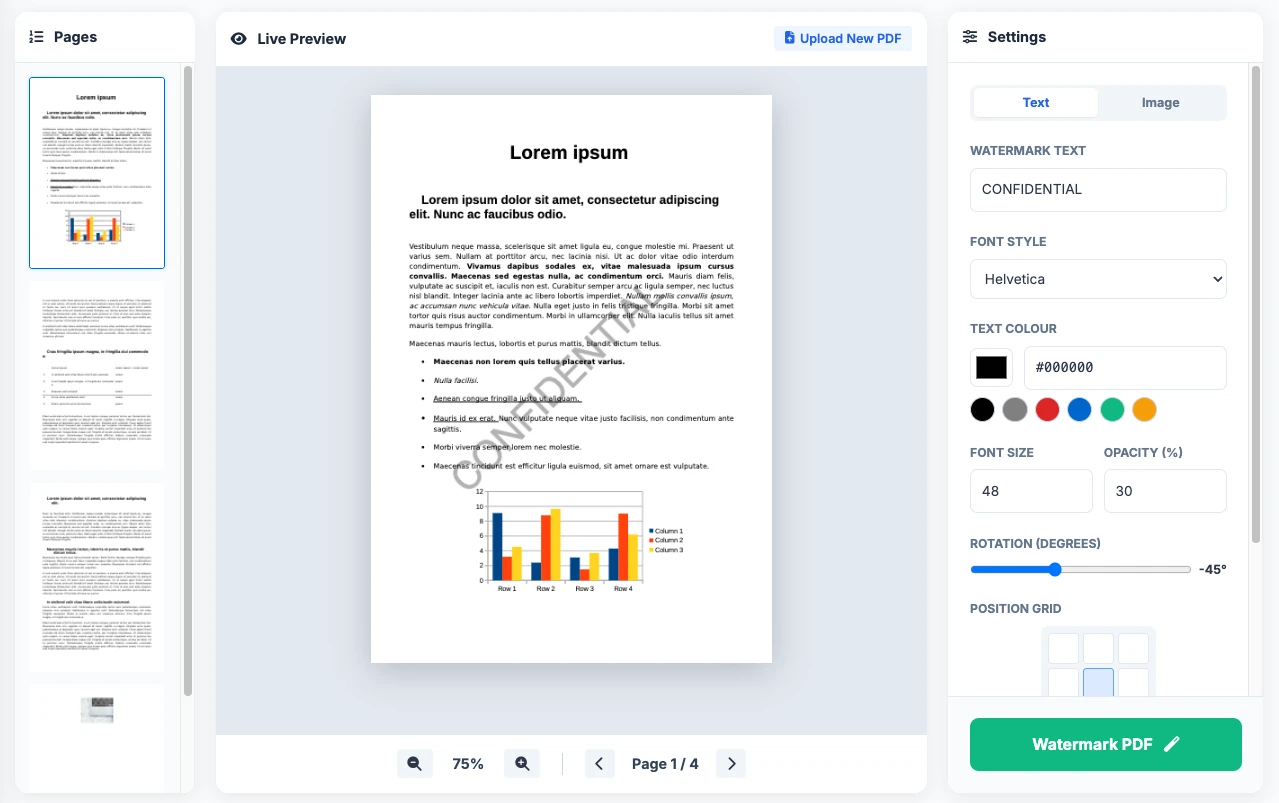
1. Page Thumbnail Strip
Move between pages easily. Pages that won't get a watermark are dimmed, so you can see your choice at a glance.
2. Interactive Canvas
Drag your text or logo watermark straight onto the page. Pull the corners to resize it or turn it to any angle.
3. Precision Settings Panel
Choose the font, colour, size, transparency and angle, or snap your watermark to any of 9 spots on the page.
Everything You Need to Watermark a PDF
Simple, fast and private — your PDF never leaves your device.
Live Preview
See exactly how your watermark looks on the real page. Drag, resize and rotate it before you download.
100% Private
Everything happens in your browser. Your contracts, reports and personal documents are never uploaded to any server.
One-Click Positioning
Snap your watermark to the centre, a corner or an edge with one click — perfect for neat, consistent documents.
12 Clean Fonts
Choose from Helvetica, Times and Courier in regular, bold and italic styles. They look sharp on every device.
Choose Your Pages
Watermark all pages, only the first or last page, odd or even pages, or your own selection like 1-3, 5, 8-10.
Original Quality Kept
Your PDF isn't turned into a picture. The text stays sharp, and you can still select, copy and search it.
Watermark Options at a Glance
A quick summary of what you can do and what's supported.
| Option | What You Get | Why It Helps |
|---|---|---|
| Privacy | Works in your browser | Your PDF is never uploaded, so it stays private |
| File type | Standard PDF (.pdf) | Works with one-page and multi-page documents |
| Logo / image formats | PNG, JPG, WebP | Use a transparent PNG for a clean logo with no white box |
| Rotation | Any angle, from -180° to +180° | Make a classic diagonal "CONFIDENTIAL" stamp |
| Transparency | 1% to 100% | Keeps the text under your watermark easy to read |
| File size | No fixed limit | Large files work best on a computer |
Toolszu vs. Traditional Online PDF Tools
Why professionals choose local browser-based watermarking over cloud upload services.
| Feature | Toolszu Watermark PDF | Other Online Tools |
|---|---|---|
| Document Security | 100% In-Browser (Never Uploaded) | Stored on remote cloud servers |
| Live Interactive Canvas | Direct Drag, Scale & Rotate | Typing position numbers by hand |
| Page Range Selection | Custom Ranges + Thumbnail Dimming | All-or-nothing or paywalled |
| Sign-Up & Usage Limits | No Account & Unlimited Tasks | 2-3 free tasks per hour cap |
| Watermark Attribution | 100% Clean (No Toolszu Logo) | Forced service branding on free tiers |
Who Uses Toolszu PDF Watermarker?
From legal teams safeguarding discovery files to creators preventing content piracy.
Legal Teams & Attorneys
Stamp "PRIVILEGED & CONFIDENTIAL" or litigation case numbers across affidavits, NDAs, and deposition transcripts with zero client-data leakage.
Graphic Designers & Creators
Place semi-transparent brand logos across commercial design proofs, client mockups, and lookbooks prior to milestone payment sign-off.
HR & Recruitment Agencies
Mark candidate resumes and portfolio PDFs as "SUBMITTED VIA AGENCY" to protect recruitment referral commissions and tracking identity.
Educators & Academic Authors
Protect proprietary course packs, lecture slides, academic thesis drafts, and study materials with institutional copyright stamps.
Real Estate & Architects
Label floor plans, schematic architectural drawings, and lease agreements with "PRELIMINARY NOT FOR CONSTRUCTION" or "SAMPLE".
Finance & Accounting Officers
Apply "AUDITED", "VOID", or "INTERNAL REVIEW ONLY" stamps to quarterly financial balance sheets, tax receipts, and annual statements.
Frequently Asked Questions
Direct answers to the most common questions regarding PDF watermarking, formats, and security.
No. Your PDF never leaves your device — the watermark is added right in your browser. Nothing is uploaded or stored, so your document stays 100% private.
No. This tool only adds watermarks. Removing a watermark that is already in a PDF needs a different kind of tool.
A PNG logo with a transparent background works best, because it shows only your logo with no white box around it. JPG and WebP images work too.
No. The watermark is added on top of your pages without turning them into pictures. Your text stays sharp, and links and selectable text keep working.
For "CONFIDENTIAL" or "DRAFT" across the page, set the transparency to about 15–30%. The watermark is easy to see, but the text underneath is still easy to read.
If the PDF asks for a password to open, unlock it first with our free Unlock PDF tool (you'll need the password), then add your watermark. PDFs that open without a password but have editing restrictions usually work as they are.
Yes. Open this page in Safari, Chrome or any mobile browser, upload your PDF and drag the watermark with your finger. No app download is needed.
Under "Apply To", choose "Custom Range" and type the pages you want, like "1, 3, 5-9". Pages that won't get a watermark are dimmed in the page list, so you can check before you download.
Pro-Tips for Professional PDF Watermarking
- Diagonal Angle: Standard corporate stamps typically use a -45° angle across the page center to cover multiple text lines, making removal difficult for unauthorized users.
- Font Selection: Choose Helvetica Bold for modern contracts and Courier Bold for technical code or engineering specifications.
- Cover Page Exclusion: For whitepapers and presentations, use Custom Range (e.g., 2-20) to keep your title cover clean while protecting all internal content.
Related Free PDF Utilities
Edit PDF Online
Add text, annotations & drawings
Sign PDF Online
Add legal e-signatures to documents
Compress PDF
Reduce PDF file size without quality loss
Merge PDF
Combine multiple PDF files into one
PDF to Word
Convert PDF files to editable DOCX
PDF to JPG
Convert PDF pages to high-res JPG images
Ready to Protect Your Document?
Add your custom text or logo watermark in seconds. 100% free and processes instantly in your browser.
Upload PDF Now